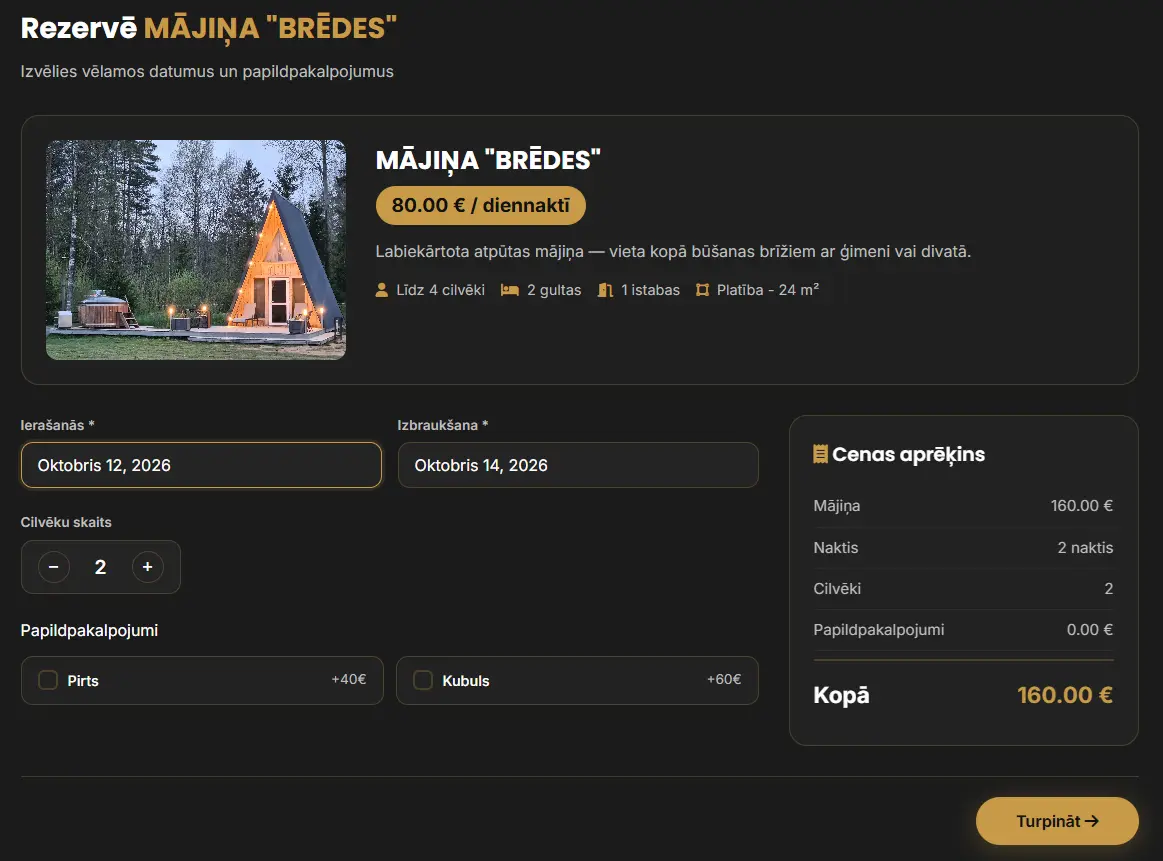
Whether you manage a single holiday cabin or several rental properties, handling bookings through phone calls, emails and spreadsheets can become time-consuming and increase the risk of missed requests, booking errors and double bookings.
With an online booking system, guests can check available dates, choose accommodation, submit reservations and receive automatic confirmations. This makes the booking process easier for both guests and property owners.
In this article, we explain how a guest house booking system works, which features are worth considering and how to choose the right booking solution for your accommodation business.
What is a guest house booking system?
A booking system is a digital solution for managing accommodation, holiday cabin or other service bookings in one place.
The system usually has two main parts:
- Client booking page- a website section where visitors can explore the offer, choose dates, enter the required information and book.
- Administration panel- a page for the owner or employee to view bookings, manage availability, change booking statuses and contact clients.
You can learn about developing these systems in the EJ PortfolioBooking systems section.
How does an online booking system work?
Consider a guest house with three holiday cabins and additional services: a sauna and hot tub.
1. The client chooses a cabin or service
The visitor opens the guest house website and explores the available cabins.
Each cabin can have its own information:
- Photographs and a description.
- Maximum number of guests.
- Available amenities.
- Price per night.
- Additional services.
- Availability calendar.
This information helps clients choose the right option without contacting the owner immediately.
2. The client checks available dates
When a cabin is selected, the system shows its booking calendar.
The availability calendar shows which dates areavailable and which are already booked.
For example, if a cabin is booked from 11 to 12 October, the system prevents new bookings that overlap with that period.
Availability must be checked both in the calendar and when confirming a booking. This helps prevent two clients from booking the same cabin simultaneously.
3. The client enters booking information
After choosing the dates, the client fills in the booking form.
It may ask for a first name, surname, email, phone number, number of guests and additional requests.
If the business offers a sauna or hot tub, the client can choose additional services at this step.
The system calculates the total based on the selected dates, prices and additional services.
4. The booking is registered in the system
After submission, the information is stored in a database.
Depending on the system, the booking may receive a status:
- Awaiting confirmation.
- Confirmed.
- Paid.
- Cancelled.
- Completed.
If bookings require owner approval, the system must also define temporary date blocking or booking expiry rules to prevent double bookings.
5. The client and owner receive a notification
After registering a booking, the system can automatically send a notification.
The client receives an email with booking information, selected dates and next steps.
The owner receives the new booking information in the administration panel or by email.
Other notification channels can be added if needed.
6. An automatic reminder before arrival
The booking system can send a reminder before arrival.
For example, one day before the booking starts, the client receives an email with the arrival time, address, contact details and other instructions.
This reduces the need to send the same information to each client separately.
Which features does a good booking system need?
Not every guest house needs a complex system with dozens of features. However, several features are particularly useful for accommodation booking management.
- Availability calendar
The calendar is one of the most important booking system features.
It should show available dates, prevent overlapping bookings and let administrators manually block dates, for example for repairs or private use.
- Automatic email notifications
Automatic notifications can be sent at different booking stages: after a request, after confirmation, before arrival or after the stay.
This helps ensure timely communication with clients.
- Administration panel
The owner needs a convenient place to manage bookings.
An administration panel can show upcoming arrivals, booking statuses, client contact details, payments and an occupancy calendar.
If several employees work at the guest house, different access permissions can be created.
- Booking additional services
Many holiday businesses offer a sauna, hot tub, event terrace or other services alongside accommodation.
The booking system can include additional service selection, price calculation and availability checks.
For example, a client books a cabin for two nights and adds a hot tub for one evening.
The system combines everything in one booking.
- Online payments
Depending on the business model, deposit or full payments can be added.
For example, a booking may be confirmed only after receiving a deposit.
Use a trusted payment provider and handle payment statuses correctly. A booking must not be treated as paid merely because the client returned from the payment page.
What are the benefits for a guest house owner?
Less manual administration
Checking availability and sending the same information manually to every client takes time.
An automated system can handle repetitive tasks, giving the owner more time to welcome guests and develop the business.
Lower risk of double bookings
A properly developed system checks overlapping dates and controls booking confirmation.
This is especially important where several cabins or services can be booked at the same time.
Accepting bookings around the clock
Clients do not have to wait for the owner to answer a call or message.
Visitors can submit a booking request whenever the system is available. With automatic confirmation, a booking can be completed without an employee's involvement.
Clear booking history
All bookings are in one place.
The owner can review previous and upcoming bookings, check payment statuses and prepare reports.
A more convenient client experience
A clear booking form, understandable prices and an availability calendar help clients decide faster.
Booking should also be convenient on a mobile phone.
A practical example: a holiday cabin booking system
Imagine a holiday property with two cabins, a sauna and a hot tub.
Previously, the owner accepted all bookings by phone or social media. To check availability, they had to open a calendar and search for free dates manually.
After introducing a booking system, the process could look like this:
- The client opens the website and chooses one of the two cabins.
- Selects available dates in the calendar.
- Adds a sauna or hot tub.
- Enters contact information and submits the booking.
- The system checks availability, saves the booking and sends a notification.
- The owner confirms the booking in the administration panel if manual approval is needed.
- The client receives an automatic reminder before arrival.
This illustrative example shows a possible workflow. The specific features depend on the business's needs.
Similar solutions can be adapted for guest houses, holiday homes, saunas, campsites and other holiday service providers.
An existing booking platform or a custom system?
Businesses usually have two main options: use an existing platform or commission a custom system.
Existing booking platforms
Existing solutions can suit businesses that need standard accommodation bookings.
Their benefits may include faster setup, established features and available integrations.
Consider subscription fees, commissions, customisation limits and the ability to manage several sales channels.
A custom booking system
A custom system is built around a particular business's workflows.
It can suit businesses combining cabin bookings with a sauna, hot tub, gift cards, special pricing rules or other non-standard features.
Development, maintenance, security and future improvement costs must also be considered.
A custom system does not automatically synchronise with external booking platforms. If the business uses several sales channels, those integrations must be planned separately.
Read more about custom solutions in the Custom IT systems development section.
How much does a guest house booking system cost?
Development costs depend on the required features, design, integrations and project complexity.
A simple booking form and calendar require a different amount of work than a system with several properties, payments, gift cards and an administration panel.
The price can be affected by:
- The number of bookable cabins or services.
- The need for custom design.
- The booking confirmation process.
- Payment system integrations.
- Automatic emails and reminders.
- Multiple language support.
- Administration panel features.
- Integrations with external platforms.
- System maintenance and technical support.
Before development, define the problems the system must solve and which features are needed from the start.
Not every planned feature has to be developed immediately. The system can grow gradually, starting with the most important features.
How do you choose the right booking system?
Before developing or purchasing a booking system, answer several questions.
How many properties need to be booked?
One cabin may only need a simple calendar, while several properties require broader management.
Is automatic booking confirmation needed?
Some businesses need to retain manual control over each request.
Will online payments be needed?
Decide whether clients will pay a deposit, the full amount or on arrival.
Do you use other booking platforms?
If bookings arrive through several channels, assess calendar synchronisation options.
Will clients have access to additional services?
A sauna, hot tub and other activities may need separate availability rules.
How will client data be protected?
The system must provide appropriate access controls, secure data processing and personal data protection.
These answers help choose a solution that meets the business's real needs without unnecessary features.
Frequently asked questions (FAQ)
Can a booking system be added to an existing website?
Yes, in many cases it can be integrated into an existing website. Options depend on the website technology, server access and required features.
Can the system automatically block booked dates?
Yes. The system can make booked dates unavailable for new bookings. Server-side checks are also needed to prevent conflicts between simultaneous bookings.
Can a client book a cabin and sauna in one booking?
Yes. A custom system can combine several services in one booking process if their availability and pricing rules are correctly defined.
Can the system send automatic emails?
Yes. It can automatically send confirmations, reminders and other notifications. Secure and reliable email delivery must also be planned.
Does the booking system work on a mobile phone?
Yes, if it has a responsive design. Clients can check availability and book from a phone, tablet or computer.
Is a custom booking system suitable for a small guest house?
It depends on the needs and budget. An existing solution may suffice for standard bookings. A custom system may suit specific services and workflows better.
Can a booking system replace manual client communication?
Some repetitive tasks can be automated, such as availability checks, booking registration and reminders. Individual questions, changes and unusual situations may still need an employee's involvement.
A booking system as part of business digitalisation
A booking system can become a tool for managing everyday business work.
For example, booking information can support automated tasks, client notifications, reports or other business operations.
Introducing these processes is also connected to business process automation.
If the business does not yet have a website, the booking system can be planned alongside website development, creating a consistent, convenient digital experience for clients.
Conclusion: does a guest house need a booking system?
If a guest house or holiday property regularly receives booking requests, a digital booking system can help organise everyday work.
It makes checking availability easier for clients, centralises booking management and automates repetitive tasks.
The best solution depends on the business's size, services and existing workflows.
The priority is a system that makes work easier, rather than the largest possible number of features.
Need a booking system for your guest house?
Are bookings still accepted by phone, social media or recorded in a spreadsheet?
EJ Portfolio develops custom booking systems and websites, tailoring the features to each business's needs.
A solution can include a booking calendar, administration panel, automatic notifications, additional services and other required features.
Explore booking system development optionsor contact EJ Portfolio to discuss your business idea.
From an idea to a working system: let's build a solution that helps your business work more efficiently.
All articles